
Open the Health app after wearing an Apple Watch overnight and two very different kinds of sleep information can sit uncomfortably close together: a tidy 0–100 sleep score and a medical-sounding sleep apnea notification system. They are not the same kind of claim. The sleep score is a consumer summary metric meant to compress several sleep patterns into one number. The apnea notification feature is an FDA-cleared screening notification for possible signs of moderate-to-severe obstructive sleep apnea. Neither one is a diagnosis.
That distinction matters because Apple Watch sleep tracking now covers both routine coaching and health screening. A score can make a vague bad morning feel legible. A notification can start a serious medical conversation. But a clean number can also feel more settled than the biology underneath it.
The Quick Difference: Score, Screening, Diagnosis
| Feature | What it measures | What it can reasonably tell you | What it cannot tell you |
|---|---|---|---|
| Sleep score | Duration, 13-day bedtime consistency, and interruptions | Whether recent sleep patterns look stable, long enough, and relatively uninterrupted | Whether your sleep is clinically healthy or whether you have a sleep disorder |
| Sleep apnea notifications | Breathing disturbances inferred from accelerometer-detected movement | Whether the watch has detected a pattern that may be consistent with moderate-to-severe obstructive sleep apnea | Whether you do or do not have sleep apnea |
The sleep score deserves a little suspicion precisely because it is so easy to understand. A number out of 100 looks like a grade. Grades imply there is a right answer, a pass line, and a clean hierarchy between last night and the night before. Apple’s score is more mechanical than that: it is a weighted formula built from what the watch can estimate overnight.
The apnea feature deserves a different kind of caution. It has FDA 510(k) clearance and published validation numbers, which makes it more than a wellness nudge. But its job is still to notify, not to confirm. A notification should move you toward clinical testing. A lack of notification should not talk you out of care if symptoms are present.
What the Apple Watch Sleep Score Is Actually Scoring
In watchOS 26, Apple’s sleep score is built from three components: up to 50 points for sleep duration, up to 30 points for bedtime consistency across 13 days, and up to 20 points for interruptions detected by the accelerometer. The score is then grouped into labels ranging from “Very Low” at 0–40 to “Very High” at 96 and above.[1]
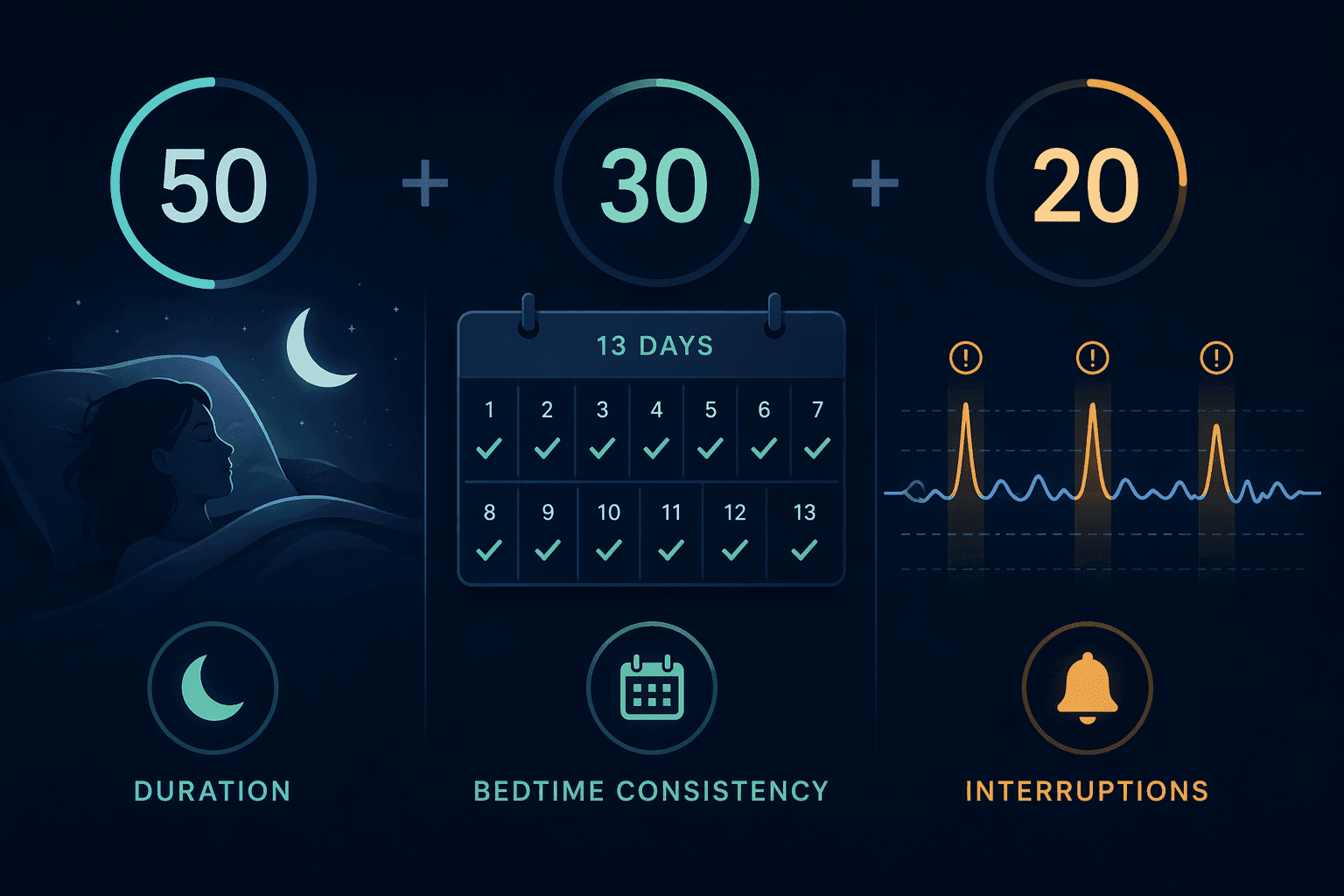
The weighting is revealing. Half the score is about duration. Nearly a third is about whether your sleep onset time has been consistent over the prior 13 days. The remaining portion is about interruptions. That means the score is not a direct measurement of how restored your brain is, how much deep sleep you “needed,” or whether a disorder is present. It is a structured summary of several behaviors and movement-derived signals.
This can be useful. If your score falls after a week of irregular bedtimes, the watch is probably pointing at something real enough to act on: your schedule drifted. If the duration portion is consistently weak, the first fix is not exotic supplementation or a new device setting; it is protecting enough time in bed. If interruptions dominate the problem, the next question is whether the cause is environmental, behavioral, medical, or simply the watch interpreting movement as fragmented sleep.
What it should not do is settle a private argument with your body. A high score after a groggy morning does not prove the grogginess is imaginary. A low score after a night that felt fine does not prove something is wrong. The score is best treated as a trend prompt: look for repeated patterns, then ask what changed in schedule, alcohol, exercise timing, illness, stress, medications, room conditions, or nighttime symptoms.
The 13-day consistency piece is more specific than it looks
Bedtime consistency sounds like a gentle lifestyle reminder, but Apple’s implementation uses the standard deviation of sleep onset timing over 13 days.[1] In plain terms, the watch is not only asking whether you slept enough last night. It is also asking whether your recent sleep timing has been bouncing around.
That makes the score more useful for routine-building than for judging a single night. One late flight, one sick child, or one badly timed work deadline can drag a recent pattern without meaning your underlying sleep health has collapsed. The better use is to notice whether your life has quietly normalized an unstable schedule.
Training on Millions of Nights Is Not the Same as Independent Validation
Apple says the sleep score algorithm was trained on more than 5 million nights of data from the Apple Heart & Movement Study and informed by guidance from major sleep organizations, including the American Academy of Sleep Medicine, the National Sleep Foundation, and the World Sleep Society.[2]
That is a serious training base. It is also not the same as an independent study showing that the final score predicts clinical outcomes, tracks polysomnography-derived sleep quality, or improves health decisions. As of June 2026, the important gap is not that Apple has no rationale for the formula. The gap is that the sleep score itself has not been independently validated in the way a cautious user would want before treating it as a health-grade measurement.
The difference can feel academic until the score lands in your app. “Trained on over 5 million nights” tells you the model had a large development dataset. It does not tell you how often a “Very High” score corresponds to clinically adequate sleep for people with insomnia symptoms, sleep apnea, restless legs, circadian rhythm disruption, chronic pain, depression, perimenopause-related awakenings, or medication-related sleep changes. Those are not edge cases in real bedrooms.
For readers who want the broader evidence picture beyond the score, the separate Apple Watch sleep tracking accuracy review is the better place to look at peer-reviewed accuracy evidence across sleep tracking functions. The narrower point here is simpler: a score can be thoughtfully designed and still not deserve clinical authority.
How to Use a Low Sleep Score Without Overreacting
A low score is most useful when it starts with boring troubleshooting. Check which component fell before deciding what the night “means.” Duration, consistency, and interruptions point to different next steps.
- If duration is the weak point, first look at time available for sleep rather than assuming poor sleep quality.
- If bedtime consistency is the weak point, look at the past two weeks, not just last night.
- If interruptions are the weak point, check obvious causes such as room temperature, alcohol timing, late meals, pets, a partner’s movement, bathroom trips, or symptoms that wake you.
- If the score stays low while you also have daytime sleepiness, loud snoring, morning headaches, insomnia symptoms, or a partner’s concern, treat the symptoms as more important than the score.
This is where a watch can be genuinely helpful. It can preserve the pattern you might otherwise forget: the week your bedtime slid later, the stretch of short nights after a schedule change, the cluster of interruptions after alcohol or illness. Bring that pattern into the conversation. Do not bring the score as if it were a lab result.
Sleep Apnea Notifications Are a Different Class of Feature
Apple’s sleep apnea notification feature received FDA 510(k) clearance under K240929 on September 13, 2024.[3] That regulatory status matters. It means the feature is not merely a sleep score dressed in medical language. It was reviewed as a notification tool for possible signs of sleep apnea.
It is still important to notice what the watch is measuring. The feature tracks “breathing disturbances” through the accelerometer. It is looking for small wrist movements associated with disrupted breathing. It is not measuring airflow. It is not measuring oxygen desaturation. It is not performing the same job as a sleep lab or an FDA-cleared home sleep apnea test.
In Apple’s clinical validation study of 1,448 participants, the sleep apnea notification feature had weighted sensitivity of 66.3% for moderate-to-severe obstructive sleep apnea, defined as an apnea-hypopnea index of 15 or higher, and specificity of 98.5%.[4]
Those two numbers should not be blended into a vague statement that the feature is “accurate.” They mean different things. The high specificity means that when the feature does notify, false positives were uncommon in the validation data. The 66.3% sensitivity means the feature may miss roughly one in three moderate-to-severe obstructive sleep apnea cases. That is the number to remember if you snore, wake gasping, feel unrefreshed, have daytime sleepiness, or have a partner who is worried.
A notification is meaningful; silence is not reassurance
The practical reading is straightforward. If the watch sends a sleep apnea notification, take it seriously enough to seek confirmation. If it does not send a notification, do not use that silence to dismiss symptoms. A screening feature with modest sensitivity is not built to rule the condition out.
This is especially important because obstructive sleep apnea is often first noticed by someone else. The person asleep may not remember breathing pauses, choking, or repeated arousals. If a bed partner reports concerning breathing patterns, that report deserves attention even if the watch has not flagged anything.
For a deeper apnea-only explanation, including the breathing disturbances feature and FDA clearance context, use the dedicated guide: Can Your Apple Watch Detect Sleep Apnea? This article keeps the focus on how the apnea notification sits beside the newer sleep score.
What to Do If the Watch Sends a Sleep Apnea Notification
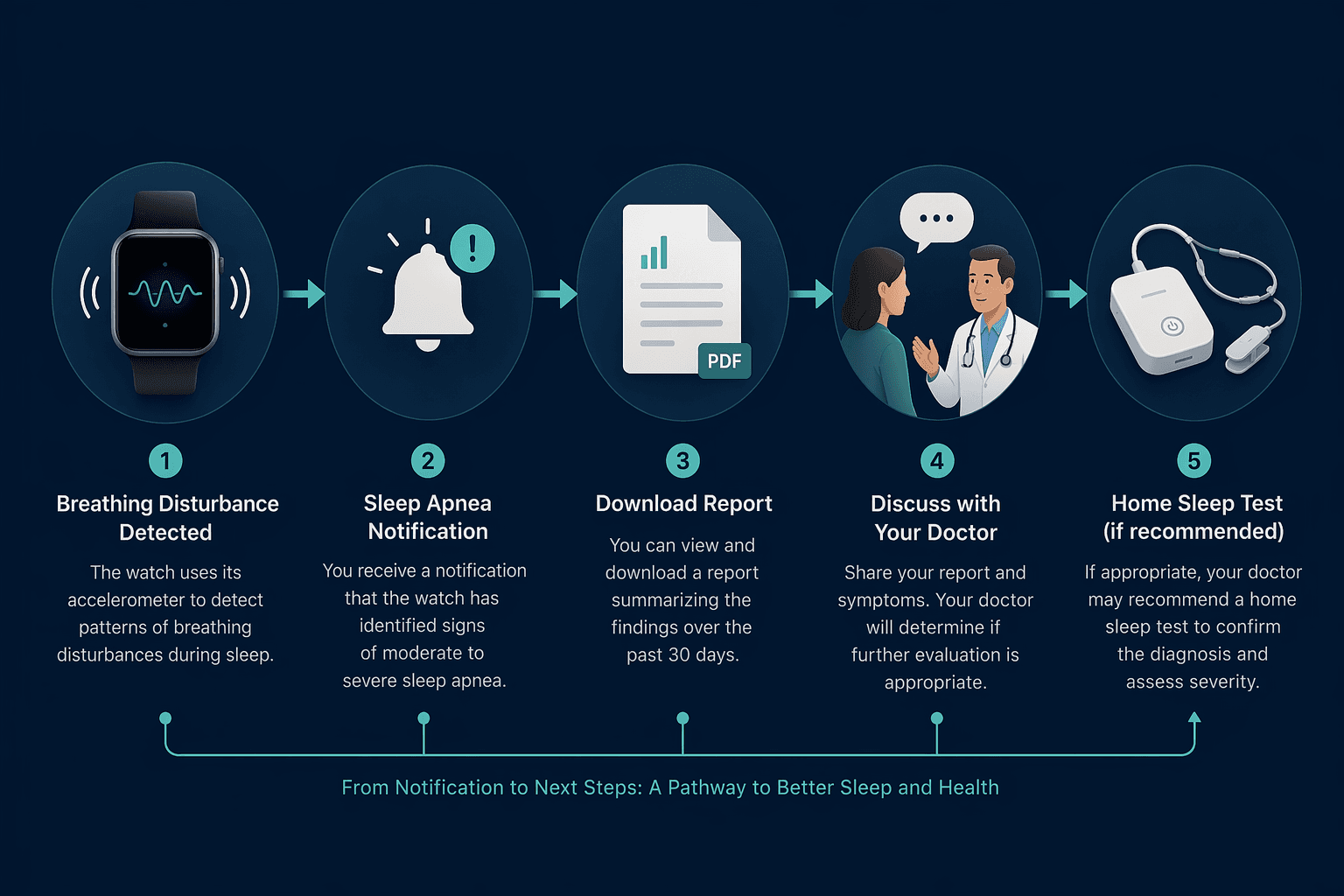
Apple’s own pathway is more restrained than the way many users will be tempted to read the alert. When a notification fires, the watch can generate a PDF report covering approximately 30 days of data, and the Health app can show up to 3 months of breathing disturbance information. Apple recommends clinician review and confirmation with an FDA-cleared home sleep test before clinical action.[2]
- Save or export the PDF report from the Health app.
- Write down symptoms the watch cannot fully capture: snoring, witnessed pauses, choking or gasping, morning headaches, daytime sleepiness, blood pressure concerns, and how long the pattern has been happening.
- Bring both the report and symptom notes to a clinician rather than trying to self-diagnose from the notification.
- Expect confirmatory testing, often with an FDA-cleared home sleep apnea test or another clinician-directed pathway.
The PDF matters because it turns a watch alert into something reviewable. A clinician does not have to rely on “my watch said something.” They can see a recent pattern, compare it with symptoms and risk factors, and decide what testing makes sense. The watch is not replacing that step; it is making the step easier to start.
Who Should Be More Careful With These Features
The available validation boundaries are not decorative fine print. The sleep apnea notification feature is validated for adults 18 and older and is not validated for people already diagnosed with sleep apnea. It also depends on consistent overnight wear, which makes battery life and charging habits part of the health-data story.
That last point is mundane but consequential. A watch cannot interpret nights it did not record. If you charge it overnight twice a week, wear it loosely, or remove it when it feels uncomfortable, the sleep record becomes patchy. Patchy data can still be useful for routines, but it is weaker support for interpreting patterns.
| Situation | Better interpretation |
|---|---|
| High sleep score but persistent daytime sleepiness | Do not assume sleep is healthy; symptoms still deserve attention. |
| Low sleep score after travel, illness, or a disrupted week | Look for a short-term routine disruption before assuming a disorder. |
| Sleep apnea notification appears | Treat it as a reason to seek clinician review and confirmatory testing. |
| No sleep apnea notification but loud snoring or witnessed pauses | Do not treat silence from the watch as a rule-out. |
| Already diagnosed or treated for sleep apnea | Use clinician-directed tools and treatment data rather than relying on this notification feature. |
Where the Watch Helps Most
The Apple Watch is strongest when it lowers the friction between noticing a pattern and doing something sensible about it. It can show that your sleep timing has become erratic. It can make short sleep harder to rationalize away. It can preserve a record of interruptions. And, if the apnea feature fires, it can produce a report that helps move the conversation from worry to evaluation.
It is weakest when the number becomes the verdict. A high score is not proof of healthy sleep. A low score is not a diagnosis. A missing apnea notification is not reassurance for a symptomatic person. The right level of trust is active but limited: use the data to ask better questions, not to close the case.
Device comparisons can help if you are deciding whether the Apple Watch is the right sleep tracker for you. The Apple Watch vs. Oura Ring vs. Fitbit comparison is better for that choice, while the broader 2026 fitness tracker sleep comparison is useful if sleep tracking is only one part of a buying decision.
A Practical Way to Read Tomorrow Morning’s Data
When the sleep score appears, start with the component breakdown, not the emotional hit of the number. If the pattern points to duration or consistency, adjust the routine and watch the trend over time. If interruptions persist, especially with symptoms, move beyond routine tweaks.
When an apnea notification appears, export the report and bring it to a clinician. When no notification appears but symptoms continue, bring the symptoms anyway. The most useful version of Apple Watch sleep tracking is not the one that makes you feel graded. It is the one that helps you notice a pattern early enough to act on it without mistaking a consumer device for a clinical assessment.
References
- Apple Sleep Score Explained: What It Means and How to Interpret It, livity-app.com
- Apple Debuts Apple Watch Series 11, Featuring Groundbreaking Health Insights, Apple Newsroom
- FDA 510(k) Premarket Notification K240929, FDA, September 13, 2024
- Apple Watch Series 10 Features Sleep Apnea Notifications, AASM
Comments
Join the discussion with an anonymous comment.